Timeline
Dynamic timeline component for tracking mission progress, quest objectives, and sequential tasks with real-time updates.
Options
| Option | Type | Required | Default | Description |
|---|---|---|---|---|
id | string | Yes | nil | Unique timeline identifier |
title | string | Yes | nil | Timeline title (supports markdown) |
description | string | No | nil | Timeline description (supports markdown) |
position | string | No | 'right-center' | Position: 'top-left', 'top-center', 'top-right', 'left-center', 'center', 'right-center', 'bottom-left', 'bottom-center', 'bottom-right' |
icon | string | No | nil | FontAwesome icon class |
iconColor | string | No | '#71717A' | Icon color (hex or CSS color name) |
iconAnimation | string | No | nil | Icon animation: 'spin', 'spinPulse', 'spinReverse', 'pulse', 'beat', 'fade', 'beatFade', 'bounce', 'shake' |
tasks | table | Yes | {} | Array of task objects (see Task Properties) |
opacity | number | No | 1.0 | Background opacity (0.0-1.0) |
Task Properties
| Option | Type | Required | Default | Description |
|---|---|---|---|---|
id | string | Yes | nil | Unique task identifier |
label | string | Yes | nil | Task display text (supports markdown) |
description | string | No | nil | Task description (supports markdown) |
status | string | Yes | nil | Task status: 'pending', 'active', 'completed', 'failed' |
icon | string | No | Auto | FontAwesome icon class (overrides default status icon) |
iconColor | string | No | Auto | Icon color (hex or CSS color name) |
iconAnimation | string | No | Auto | Icon animation (custom icons require explicit animation) |
Task Status Icons
Default icons assigned by status (can be overridden with custom icon):
pending: Circle icon (gray)active: Spinner icon (blue, auto-spinning)completed: Check circle icon (green)failed: Times circle icon (red)
Functions
-- Show a timeline with tasks
exports.lation_ui:showTimeline(data)

-- Hide a timeline
exports.lation_ui:hideTimeline(id)

-- Update task(s) - supports both single and multiple updates
exports.lation_ui:updateTimelineTask(timelineId, taskData, status)
-- Single task: updateTimelineTask(timelineId, taskId, status)
-- Multiple tasks: updateTimelineTask(timelineId, tasksArray)

-- Add a new task to timeline
exports.lation_ui:addTimelineTask(timelineId, task)

-- Update timeline properties (title, description, icon, etc.)
exports.lation_ui:updateTimeline(timelineId, updates)

-- Get the currently active timeline ID
local timelineId = exports.lation_ui:getActiveTimeline()
Important Notes
- Only one timeline can be active at a time - showing a new timeline will automatically hide any existing timeline
- Tasks are displayed with a vertical timeline showing status progression
- Active task status automatically triggers spinning animation on default icons
- Custom task icons do not auto-animate unless
iconAnimationis explicitly set - Timeline state is not preserved when hidden - you must pass full configuration when showing again
Example
-- Basic timeline with mission tasks
exports.lation_ui:showTimeline({
    id = 'heist_mission',
    title = 'Bank Heist',
    description = 'Complete all objectives to finish the heist',
    position = 'right-center',
    icon = 'fas fa-mask',
    iconColor = '#EF4444',
    opacity = 0.95,
    tasks = {
        {
            id = 'gear',
            label = 'Acquire equipment',
            description = 'Get supplies from the warehouse',
            status = 'completed'
        },
        {
            id = 'hack',
            label = 'Hack security system',
            description = 'Disable cameras and alarms',
            status = 'active'
        },
        {
            id = 'vault',
            label = 'Access the vault',
            status = 'pending'
        },
        {
            id = 'escape',
            label = 'Escape the area',
            status = 'pending'
        }
    }
})
-- Update single task when objective is completed
exports.lation_ui:updateTimelineTask('heist_mission', 'hack', 'completed')-- Update multiple tasks at once (recommended for sequential progression)
exports.lation_ui:updateTimelineTask('heist_mission', {
{ id = 'hack', status = 'completed' },
{ id = 'vault', status = 'active' }
})-- Add a new task dynamically
exports.lation_ui:addTimelineTask('heist_mission', {
id = 'bonus',
label = 'Bonus objective',
description = 'Collect additional loot',
status = 'pending',
icon = 'fas fa-star',
iconColor = '#F59E0B'
})-- Update timeline properties (e.g., completion message)
exports.lation_ui:updateTimeline('heist_mission', {
description = 'Heist Complete! +$50,000'
})-- Hide timeline when mission ends
exports.lation_ui:hideTimeline('heist_mission')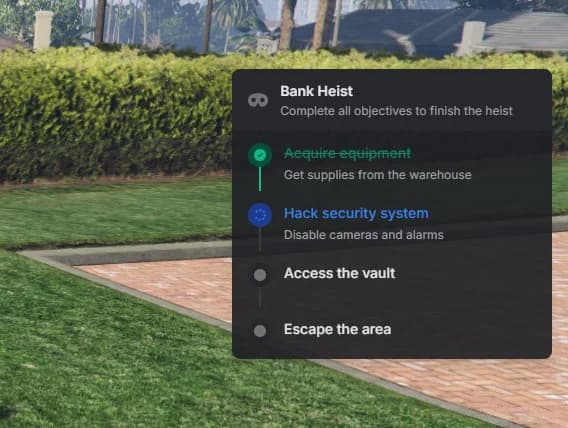
Use Cases:
- Mission/quest tracking systems
- Multi-step tutorials or onboarding
- Heist or robbery progress tracking
- Delivery route progression
- Achievement or challenge progress
- Event phase indicators
- Crafting or building sequences